Categories
Culture First Engineering Email List Family Justice and Politics Personal Software Engineering

What Culture First Has Looked Like For Me

I’ve been working at Culture Amp for over 8 years – 4 times longer than any other place I’ve worked. Clearly something here is working well for me.

When Didier Elzinga recently stepped down as CEO, it made me realise I want to share parts of my story here and why it’s been good, because it ties into the “Culture First” idea that’s the driving force behind the company he, Rod, Doug and Jon founded.

For me it’s really important to be working for an organisation with a positive mission. Culture Amp’s mission fits this: “to create a better world of work”. Full time workers spend a third of our time at our jobs – improving work is a way of improving lives. Culture Amp makes a software product to help companies be good to their people, to be “Culture First”. The idea isn’t vapid: there’s a firm belief, backed by research, that being good to your people is a path to high performance, positive impact, and business success.

The part of this mission that has resonated with me the most is not just making the product, but proving to the world that the idea is real. Culture Amp wants to be the example that proves the theory.

Here’s what “Culture First” has looked like for me in my 8 years here.

“We borrow our time at work from people and things much more important to us than the work”.
Didier Elzinga

Culture First: a beautiful reciprocity

There’s been a beautiful reciprocity in my experience working for Culture Amp. The company has been good for me personally, and I know I’ve provided my share of value to the growth of the business on its path from 150 employees to 900, and to over 10 times the annual recurring revenue.

Here are some concrete examples of what these mutually beneficial exchanges look like:

Respect in the interview process: The technical exercise was interesting, the people who interviewed me were friendly, curious, and were clearly great engineers. I am not naturally a strong negotiator, and I had given a conservative salary range when asked about my expectations. But they made me an offer above the salary range I’d asked, offering what they thought I was worth, even when I wasn’t confident to ask that for myself. I felt respected. That feeling of respect is why I said yes to their offer and was excited to join.

Regular performance and compensation reviews: 3 months after I joined, I was still happy with the extra pay compared to my last job. I had my first performance review, and they decided I was performing better than the level they had assigned me in my interview, and gave me a pay rise. I didn’t even ask for it. Since then there’s been a regular rhythm and trust – I know there will be reviews every 6 months, that they evaluate my performance against their levels, that they work hard to be fair and reduce bias, and that the salary bands are calibrated against market data. Pay negotiations don’t come naturally for me. The fact that I work somewhere with a consistent and fair process has made me feel confident I’m not being taken for granted, and has been a big part of my loyalty – and it motivates me to increase my impact, trusting it will be rewarded. Because it has been.

Supporting my tech community involvement: They encouraged me to use my interest in public speaking to submit talks to tech conferences. They allowed me to do some preparation on work time. And in return, more potential engineers heard about Culture Amp and at least a few ended up joining us and providing long term value to the company – without needing to pay commissions to recruiters! And I got to become a more visible member of the tech community and use my gifts there.

Going remote before Covid: When I interviewed in 2017, I was living in Melbourne but knew I would be moving to Perth. They said they would be open to remote work if I did my first few months in Melbourne – they had a small handful of remote engineers already. A few months in when I asked about the timing of the move – they put the question back to me using one of their values: “trust people to own decisions“. My manager asked me to think through the impact of being remote, and what would be required for it to be successful, and make a decision accordingly. I did, and it went well enough that I kept thriving. When the team lead role opened up, I wanted to try, but no one else was a remote team lead back then. They still encouraged me to apply. They trusted I could pull it off, and I became one of the first two remote product team leads in 2018. And this benefited them – two years later when Covid hit I was able to share what I knew and help the company quickly adapt to effective remote work. They took a chance on my leadership looking different, and with that experience I could then help them navigate one of the most abrupt work culture transitions of our time.

Management training: This was my first job where I got to lead a team. Culture Amp has been the ideal place to learn. I had great managers myself who I could learn from. (Thanks Kevin, Jordan and Eric!) They invested in manager training with Lifelabs right at the start of my journey. They encouraged using our own product to ensure we were getting feedback. We were given help to reduce our bias in hiring and performance decisions. Our People and Experience team helped me navigate both happy conversations and tough conversations. There was so much support available. I’ve been able to ask questions on Slack – from team trust dynamics to goal setting – and I’ve had replies from other team leads, from senior leaders, and even from people with PhDs in organisational psychology who specialise in those topics. It’s a phenomenal environment to learn to manage people. Because I’ve been equipped like this, I’ve been able to lead well. I’m proud to have seen plenty of my people promoted, and a few grow through a period of struggle and low impact and get back to a place where they’re thriving. And we’ve completed plenty of really high impact projects.

Parental leave: When my first child was born in 2018 Culture Amp offered 6 weeks paid parental leave, and dads were explicitly encouraged to take it. The company acknowledged the ways early parental leave can shift the ongoing balance of care between mums and dads, and lead to more equitable career outcomes for both parents. It also helps normalise a culture of employees putting their family first, which reduces bias against women who take their full parental leave entitlements. And of course, it gives you more time with your kids in those precious first few months, which you can’t put a price on. When my second child was born, the policy changed to 4 weeks for secondary carers, and 16 weeks for primary carers. (These days it’s 16 weeks for everyone.) Given my partner at the time was a stay-at-home mum, I applied for the secondary carer’s leave. But then, life turned out to be really hard. Having that second child was the start of prolonged sickness, mental health challenges, and an understanding of neurodiversity in our family. I needed to take a lot of time off to look after my family. I exhausted my parental leave, then my carer’s leave and annual leave. By this point my manager had been having conversations with HR and got approval for me to have the remaining 12 weeks of “primary” leave given the exceptional circumstances. They even offered to let me take it in a part time capacity to stretch it over the remainder of the year. This was an absolute lifeline. If I wasn’t offered it, I probably would have had to resign – the pressure at home was so huge. It took a few years for more support at home to be available, and for me to find a new and more sustainable “normal”. Getting through that time was incredibly difficult. The way my managers, senior leaders, and the HR team looked out for me, provided options, and trusted me even through a period of struggle and lower impact, earned them a huge degree of loyalty from me. They trusted me – and trusted in my future impact – and did what they could to help me through one of life’s toughest seasons. And in return, I’ve been able to give several more years back at a strong level of performance.

So you can see there has been a reciprocal trust and investment and benefit between me and the company.

Shared humanity

There’s another story of my time at Culture Amp that is far more human and can’t be quantified in growth rates for the company or career growth for me.

Early in my tenure someone new joined our team. They were a brilliantly sharp engineer who overlapped in a lot of the same technical interests and specialties as me, but whose ability to think about complex systems, both technical and social, allowed them to identify patterns others didn’t see. It was wonderful to watch their strategic thinking at work. I learned a lot from them and working with them was a highlight of my career.

They were also the first friend to openly talk to me about the experience of being autistic. We’d been working together for a few years, and my understanding of neurodiversity was pretty limited. I think when I noticed people struggling with sensory overwhelm in large group settings I would have put it down to an “extrovert / introvert” dynamic and not thought more about it.

Culture Amp has a company value “Have the courage to be vulnerable”, and one way of expressing that is sharing parts of your authentic identity at work. But doing so requires trust. That trust built up over a few years, and eventually there was enough for them to talk openly with me about being autistic.

It was a beautiful thing to have someone I respected so much, and who I counted as a friend not just a coworker, help me understand how their motivations at work play out, why many office environments are overwhelming, why restructures and team instability can be very destabilising, and why some software problems are really well suited to their brain, and others are not.

They’d take time to explain parts of their experience, like why you can struggle to focus on the task in work hours, only to struggle to stop in the evening – they explained the struggle isn’t the ability to focus, the struggle is the ability to regulate focus. And that includes struggling to stop even when hyper-focused at an inconvenient or unhealthy time.

Or they’d send links to articles like this that help reframe communication problems as an equal burden between someone neurotypical and someone neurodiverse1. Things like this helped me understand neurodiversity so much better, and removed any sense of stigma from it.

Just a couple of months after these conversations started, we had the first signs that my eldest son might be autistic. He was three, and his mum had interrupted a repetitive behaviour, and his response was an extreme meltdown. It started a conversation, and a family friend who is a school psychologist came and talked to us about it. After watching him play, she said we should definitely be seeking a diagnosis.

It was a big moment. Did my son have a disability? Would he grow up normal, or would this make everything different? I loved him and his quirks. I didn’t want to start seeing him differently. When I talked to friends about it – I’d well up with tears, I didn’t want the world to not appreciate him. I didn’t want to not appreciate him.

In that time, with all of the big questions that it brought up in me as a dad, the thing that gave me the most encouragement was my friend at work who was brilliant, kind, authentic, and generous. I had a picture of how beautiful an autistic life can be, and it gave me hope and reframed the diagnostic conversation for my son from one around a deficit to one around understanding him better. I’m incredibly grateful.

There’s also been that same reciprocity. Things like understanding the Interest Based Nervous System have made a huge difference to how I manage engineers, divide work, plan projects and line up growth opportunities. I’ve been a more effective manager, and it’s also helped me. My friend encouraged me that, with or without a diagnosis, if the strategies help, I can learn from them.

Someone at work also started a Slack channel for parents of neurodiverse kids. I literally cried when I found it. Parenting neurodiverse kids well as they’re adapting to a world that isn’t always friendly to their brain is no easy task. Realising I wasn’t alone, and that workmates I’d collaborated with had the same struggles was such a big moment of feeling seen and understood. They were here, sharing stories, providing mutual support.

My understanding of myself, my friend at work, my children, autistic people – and humans in general! – was made so much richer, because there was a “courage to be vulnerable” moment where someone opened up and shared so openly with me what their experience of being neurodiverse was like.

The value of Culture First

And here-in lies my point in writing this blog post. Culture Amp has tried to model a culture first approach and show other companies that it’s a good way to do business. And in my story – the ways the company has supported me has seen a return on investment – I’ve been more engaged and higher performing.

But it’s more than that transaction – some of the value created isn’t captured by the business. In my faith there’s this idea that “you shall not reap all the way to the edges of your field” – that you shouldn’t capture all of the value, and that it’s good if some of it is left for the community.

A culture first approach to business makes sense through an economic lens – more than enough of the value you invest in your people is returned to the business – it’s a smart strategy. But there’s a whole world of value that isn’t captured by the business, but enriches the lives of your employees, and their families, and our communities. It might not show up in your company performance dashboards, but this is the impact I most care about.

And I suspect it’s the impact Didier most cared about when he, Doug, Rod and Jon founded the company. For having the courage to start something and try to do it “Culture First” – and for the impact it’s had on me and my family and my community – I’m grateful.

  1. This was fascinating – in one study participants played the game “Telephone” – where each person passes a message down the line and you see how different it is at the end – with autistic groups, with non-autistic groups, and with mixed groups. You’d think that because part of an autism diagnosis is having communication deficits that the autistic group performs poorly. It’s actually the mixed group that suffers. ↩︎
Categories
Front End Development

Dropping support for Internet Explorer 11 (when 18% of your revenue comes from companies still using it)

At Culture Amp we dropped support for Internet Explorer 11 in March this year, despite a significant portion of our annual recurring revenue coming from companies with over 10% of users still on IE11. We did that without complaints. How? Through a mix of customer conversations, clear planning, a neat technical trick, a focus on UX, and clear communication. Here’s the story of how we did it.

About us and our customers

To help understand the context we’re working in, it helps to know a bit about our company. Culture Amp is on a mission to create a better world of work, by building a software platform that helps companies understand their people and improve their company culture.

(p.s. Culture Amp is hiring engineers in Australia and NZ. It’s the best place I’ve ever worked. If you’re interested you can check out open roles or contact me, hello@jasono.co)

We have over 4000 customers ranging from small business to large enterprise. Some of our companies are progressive tech companies that have modern IT systems… and some still were using IE11.

Our leading product is an employee engagement platform which captures survey responses and shares insights and reports with millions of employees around the world. We care a lot about giving those employees a voice, and so we spend a lot of time making sure that our platform is accessible for as many people as possible. And browser support is a form of accessibility.

We don’t want to exclude people from our platform, and prevent their voice from being heard in their company surveys, because of their available technology.

Why we wanted to drop IE11

Having said that, supporting Internet Explorer 11 sucks. Most of our team are developing on MacBooks, so testing in IE11 requires either firing up a virtual machine or using a tool like BrowserStack. If you try to do this for every pull request, your pace of work really slows down. If you don’t, you start getting support tickets coming in because something unexpected broke in IE11, and those are hard work to debug too!

And also, we wanted to use new browser technologies. Being in the team that maintains our Kaizen design system, I was particularly excited about being able to use CSS Custom Properties and CSS Grid finally.

First question… is anyone still using it?

We were initially hoping we could look at IE11 usage and it would be so miniscule, no one would notice if we dropped support. (We dropped IE10 support when usage was below 1%).

Unfortunately, IE11 usage was sometimes still hovering around 8%, and some weeks went as high as 15%.

We wanted to understand it more, and so asked one of our analysts to look at the revenue amounts for the clients with high IE11 usage.

% of ARR
Accounts with >10% IE11 usage18.6%
Accounts with >20% IE11 usage9.5%
Accounts with >30% IE11 usage4.6%
Accounts with >40% IE11 usage3.4%
Accounts with >50% IE11 usage1.5%
This table shows a huge portion of our revenue came from companies still with over 10% IE11 usage. We needed to make sure whatever our plan was, we didn’t upset this many customers.

This was pretty discouraging, but we continued to explore our options.

Starting with a conversation

My manager Kevin Yank reached out to one of our biggest customers, who we knew required IE11, and asked to chat to understand what the situation was on the ground, rather than just looking at the analytics and giving up hope. When we chatted to them, we realized this big customer did have Microsoft Edge installed on all of their computers, it just wasn’t always the default browser when people clicked a link from their emails. If we could convince them to switch to Edge, which they already had installed, maybe we could drop support for IE11 after all.

We ended up using a version of this to reach out to all customers of a certain size who had > 20% IE11 usage. Here’s the message we used:

We’re hoping to understand the use of Internet Explorer 11 at your company.

Now that the more modern Microsoft Edge browser is available on all versions of Windows we’re hoping to redirect users of the old Microsoft Internet Explorer 11 (released in 2013) to the modern Microsoft Edge browser.

This browser is getting more and more burdensome for us to support; the user experience of our product in that browser is getting worse and worse (it is both slow and increasingly ugly there), and we’re approaching a couple of technical decisions that, if we need to support IE11, will put us in a restrictive box for years to come. (Even Microsoft themselves are beginning to no longer support Internet Explorer 11 on some of their websites!)

We’d love to understand a bit more about your IT environment:

– Under what circumstances are your users needing to access Culture Amp through IE11?

– Is there a more modern alternative browser installed on those computers that you could switch to if necessary?

Are you able to get answers to these questions, or connect us with the right person so we can discuss?

We worked with our customer account managers to send this message to all customers above a certain threshold who had high IE11 usage.

The result: every one of the customers we spoke to said that employees would have another browser (usually they mentioned Edge, sometimes Chrome) also installed that they could use, but it might not be the default.

So… if they have a better browser installed, how do we get them to use it?

A technical discovery for directing users to Edge

With the Engagement product I mentioned earlier, a key to the success of the product is having high survey participation rates. We knew that if we started blocking ~10% of users (and in some companies, >50%) it was really going to hurt the product’s effectiveness.

We needed a way to have users switch browser with a high conversion rate.

So we began asking, is there a way to open a page in Edge from a page in Internet Explorer? We found our answer on Stack Overflow – there is, using a microsoft-edge: protocol in your links.

You could also use the custom-protocol-check package on NPM to check if the link click worked, and display a message on success or failure. (Unfortunately, it can’t tell you if it will work before the user attempts the action).

We did some experimenting on Codepen, and it all worked!

A screen recording showing the Codepen example and how a link in IE11 can open the same page in Edge.

There was a big scary alert warning before Edge would open, but if you allowed it, it did work. We hoped that with the write UX design and some encouraging copy, we could convince users to click a button, click allow, and open the link.

Stage 1 UX: a “soft” notification

The first phase was to show a persistent banner across the top of the page to all IE11 users, with a link that attempts to open the same page in Edge.

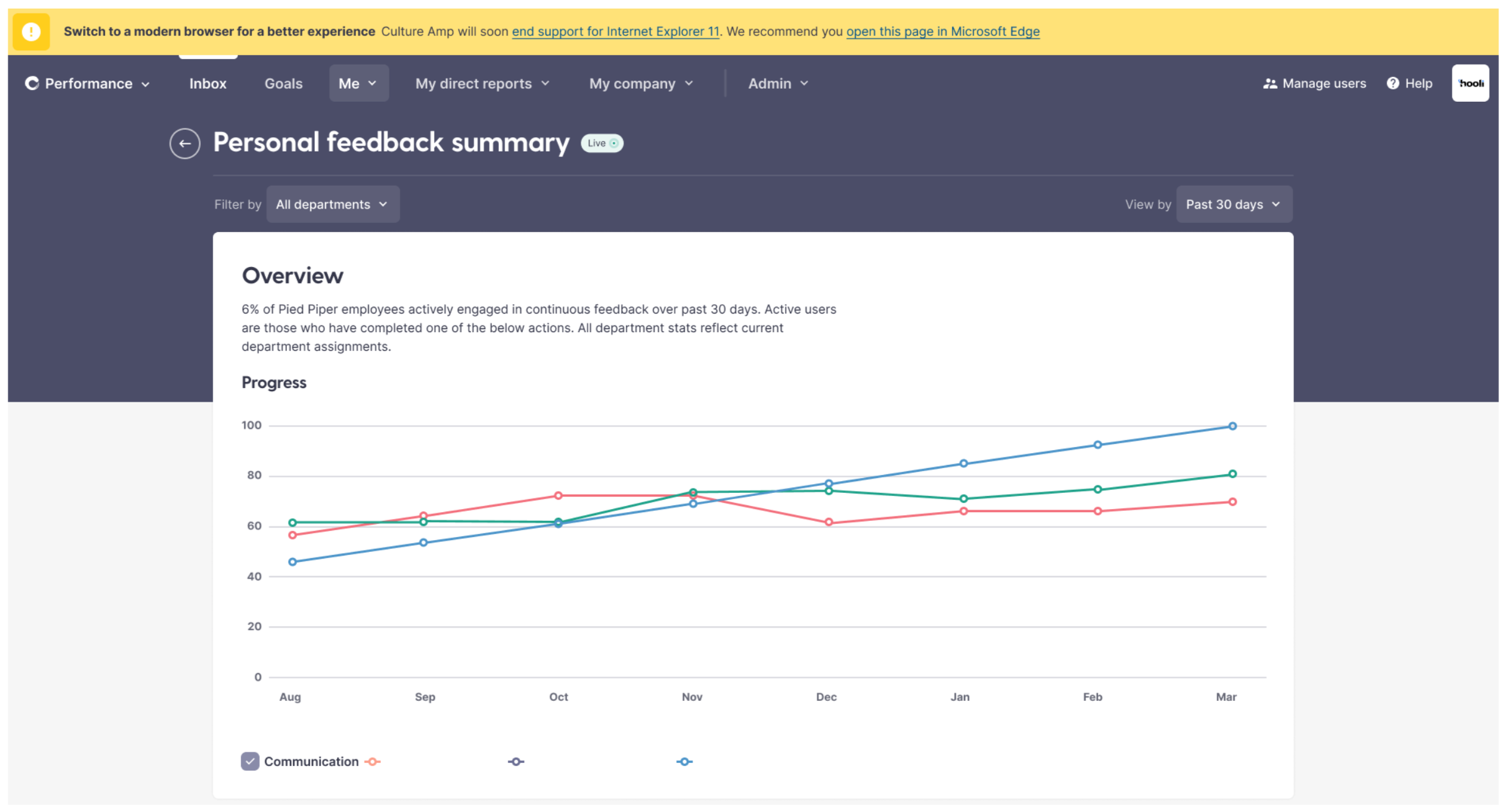
A screenshot of the notification, reading "Switch to a modern browser for a better experience. Culture Amp will soon end support for Internet Explorer 11. We recommend you open this page in Microsoft Edge."
A screenshot of the notification design.

When we released this, we knew most people would ignore the banner, because ignoring banners is what people do. But for those who did click, it would allow us to get analytics on how many of them were able to successfully launch Edge.

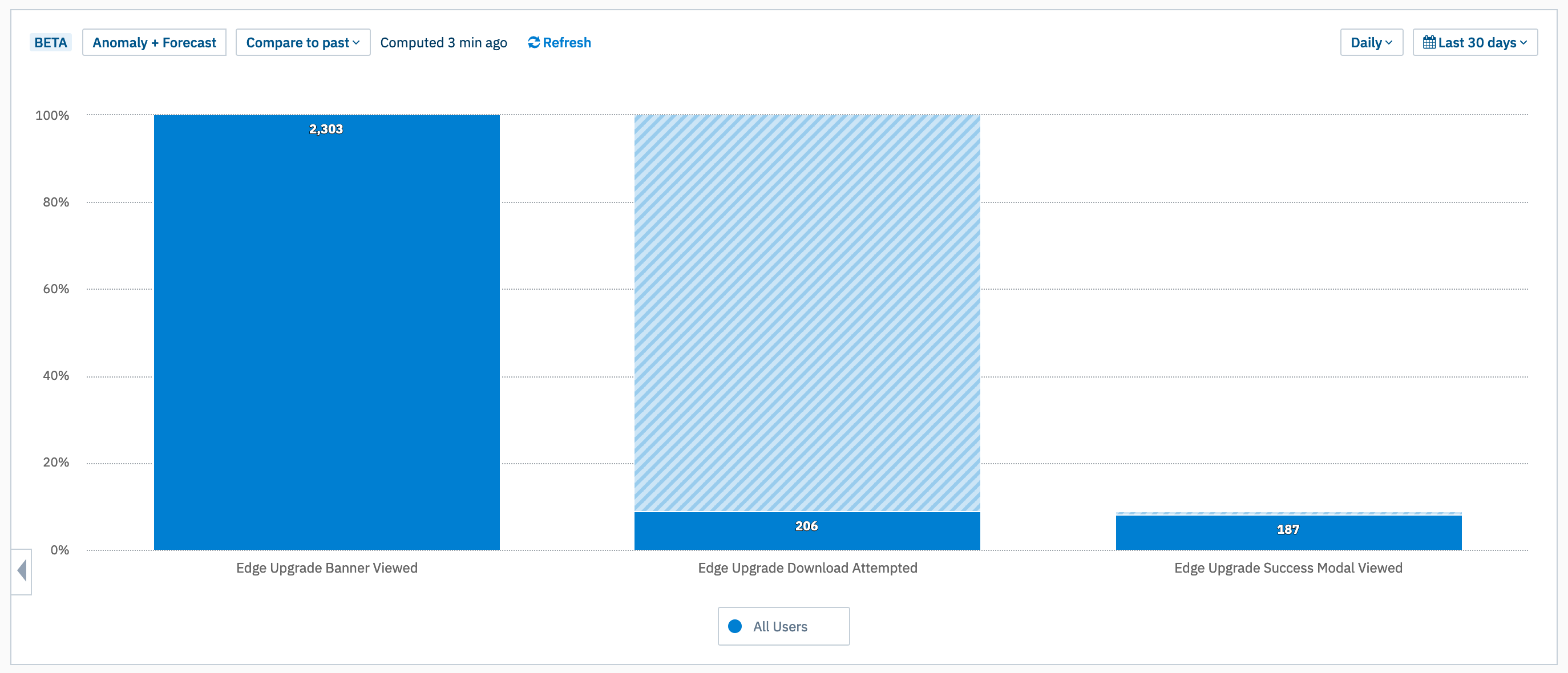
A bar chart showing 3 bars: "Edge Upgrade Banner Viewed" 2,303. "Edge Upgrade Download Attempted" 206. Edge Upgrade Success Modal Viewed 187.
We measured how many users saw the banner, how many clicked it, and how many had Edge open successfully.

The good news: even though only 9% of people clicked the banner, when they did, 90% clicked “Allow” and successfully opened the page in Edge. (Apparently the scary alert box wasn’t as scary as I thought!)

A screen recording of the "Phase 1" workflow opening Edge from a banner.
The banner displays in Internet Explorer 11. When the user clicks the “Switch to Microsoft Edge” link, a confirmation popup appears, and when they click “allow” the page opens in Microsoft Edge.

So, all we needed to do was force people to click the button. And that meant something more forceful than a notification banner.

Stage 2 UX: a “hard” interstitial page

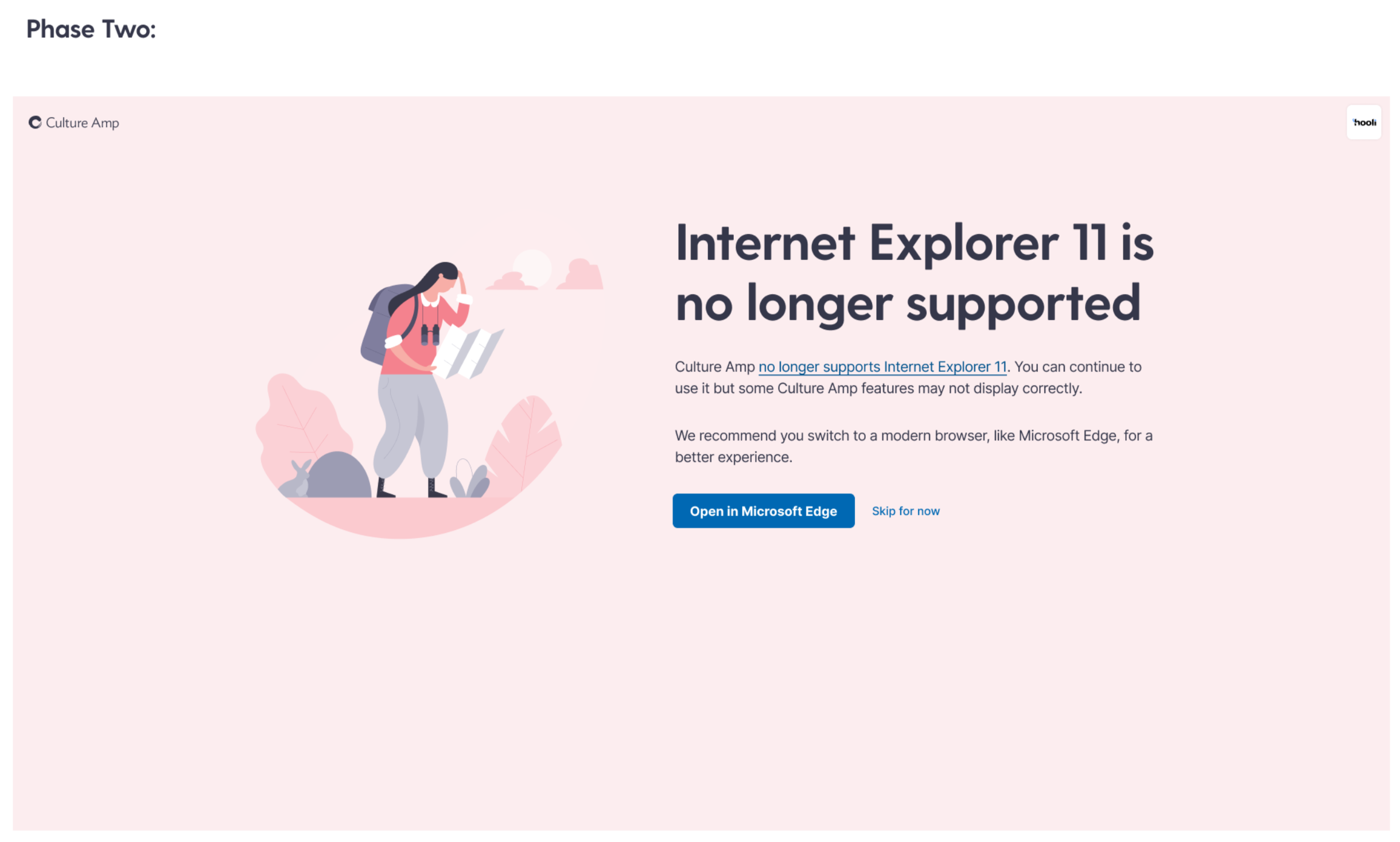
A screenshot of the IE11 deprecation page. It shows a page which reads "Internet Explorer 11 is no longer supported". There are two buttons, the primary button reads "Open in Microsoft Edge", the secondary button reads "Skip for now"
We hoped a full page interstitial would do the trick.

For the official end of support, we made it much harder to ignore. At our login screen, we redirected all users to a full page notification where the primary call to action is to open in Edge. This had much better results.

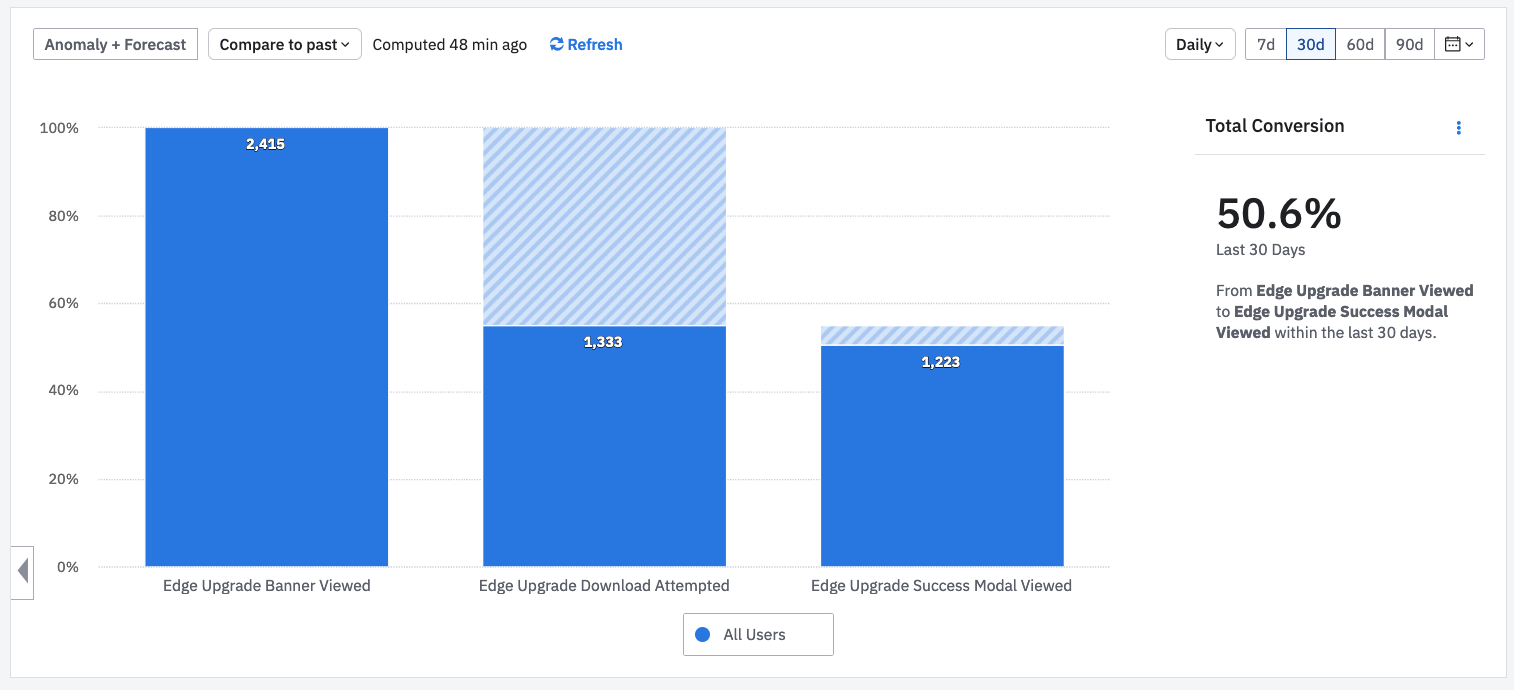
A bar graph showing 3 bars. "Edge Upgrade banner viewed" 2,415. Edge Upgrade Download Attempted 1,333. Edge Upgrade Success Modal Viewed: 1,223. The total conversion is 50.6% over the last 30 days.
This looks healthier! The absolute numbers here are smaller a few months after the transition – people are now visiting from IE11 less often. But the percentages have stayed about the same since launch.

We now have 55% attempting to open in Edge, and 92% of them still succeeding, for an overall success rate of 50%. We believe most of the other users are switching to an alternative browser manually or bouncing.

Either way, this was enough to give us confidence that anyone who wants to use our platform, is able to. And our customers shared that confidence.

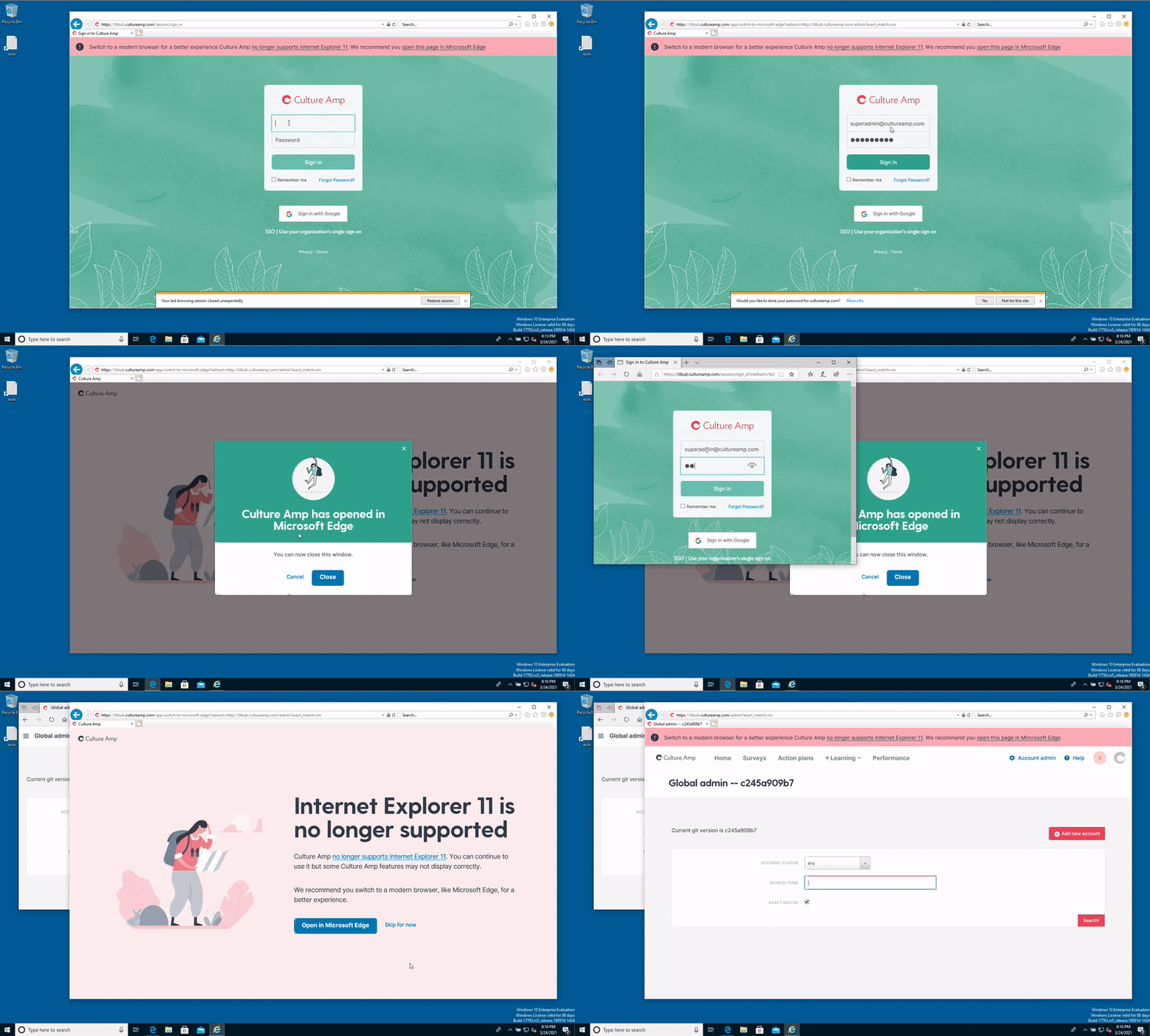
A screen recording of the "Phase 2" flow for opening Edge from an interstitial page.
On login the user sees a full page notification directing them to open in Edge. They were 5x as likely to click “Open in Edge” here compared to the top-of-page banner.

The timeline

January 2021Contact important customers to understand the impact.
January 27th, 2021Initial email to all customers. Deprecation timeline added to support guide.
February 1st, 2021Global Notification released and visible on all pages.
March 24th, 2021Final email warning to all customers. Support guide updated.
March 25th, 2021Support dropped. Interstitial Page released.
March 26th, 2021We get to stop caring about IE11 and start using new browser features!

The result

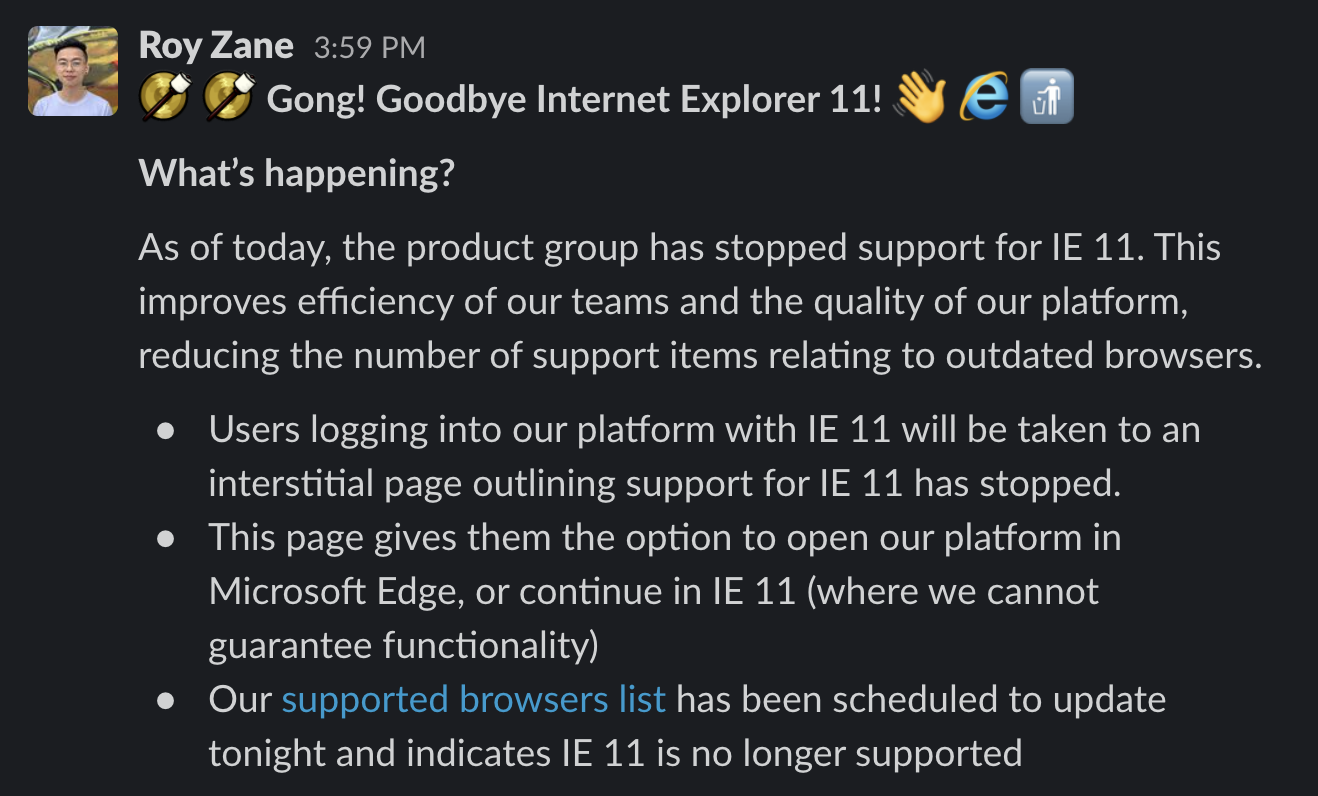
A screenshot of a Slack post, reading Gong! Goodbye Internet Explorer 11! (Wave emoji) (IE logo emoji) (Put rubbish in bin emoji)

What’s happening?

As of today, the product group has stopped support for IE 11. This improves efficiency of our teams and the quality of our platform, reducing the number of support items relating to outdated browsers.

Users logging into our platform with IE 11 will be taken to an interstitial page outlining support for IE 11 has stopped.

This page gives them the option to open our platform in Microsoft Edge, or continue in IE 11 (where we cannot guarantee functionality)

Our supported browsers list has been scheduled to update tonight and indicates IE 11 is no longer supported
Getting to announce this to the company was a special feeling.
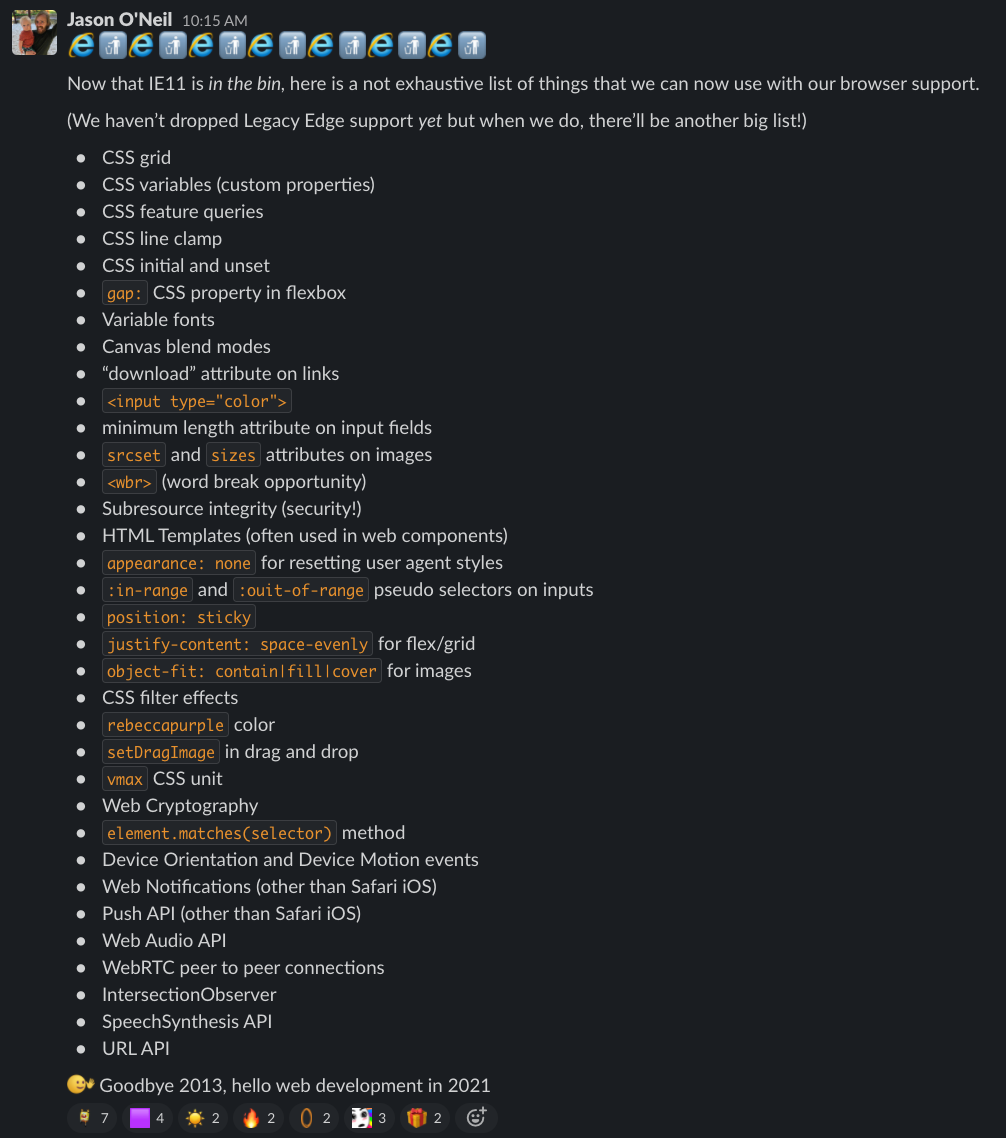
A screenshot of a Slack post reading

"Now that IE11 is in the bin, here is a not exhaustive list of things that we can now use with our browser support"

Followed by a list of dozens of new HTML and CSS features.
Getting to announce this to our front end engineers was even better

We released the change, and no customers were upset by it. We continued to see a healthy conversion of IE11 visitors to Edge by clicking the button, and a trend of less and less IE11 visitors over time.

Our teams no longer have to fix bugs in IE11, and no longer have to fire up a virtual machine to check their latest change in an ancient browser.

And we can now use things like CSS Custom Properties, which we’ve used to roll out a theme switcher in our design system.

What I’ve learned

  • Matching product analytics with business data (like account value) can paint an important picture of the impact a change will have.
  • Sometimes product analytics aren’t enough to tell the full story, and conversations with customers unearth a clearer picture, which can open up new options you might have assumed were unavailable.
  • Releasing a risky change like this in two stages helps! You can use analytics to validate a part of the conversion funnel you’re worried about (for us, if the “Open in Edge” button would actually work for people).
  • Large enterprise customers are more reasonable about old technology than I had originally thought.

Special thanks to my coworker Roy Zane who was my main collaborator in driving this project through to completion.

Categories
Front End Development

How a design system can encourage accessible, on-brand colors

This is the blog post version of a talk I gave at the Perth Web Accessibility Conference. I also repeated the talk at a “BrownBag” team lunch at Culture Amp, which you can watch here, or you can read the blog-post version below. I’ve got a live example (open source! try it yourself!) at the end of the post.

How a design system can encourage accessible, on-brand colors from Jason O’Neil on Vimeo.

On the front-end team at Culture Amp, we’ve been working on documenting and demonstrating the way we think about design, with a design system – a style-guide and matching component library for our designers and developers to use to make our app more consistently good looking, and more consistently accessible.

But first, a story.

Here’s a photo of me, my older sister, and younger brother:

A photo of 3 me and my siblings in school uniforms
Me at the back, my sister and brother in the front

Me and my brother are both red-green color blind. Most of the time color-blindness isn’t a big deal and compared to other physical limitations, it doesn’t usually make life difficult in any significant way.
But growing up, my brother Aaron really wanted to be a pilot. Preferably an air-force pilot, like in Top Gun. But for a generation that grew up with every TV show telling us “you can be anything if you try hard enough”, there was a footnote: anything except a pilot. He couldn’t be a pilot, because he was red / green color blind. The air-force won’t even consider recruiting you for that track. They’ll write you off before your old enough to join the air cadets.
Why? Because the engineers who designed the cockpits half a century ago made it so that the only way you could tell if something changed from safe to dangerous was if an LED changed from green to red. So people with red-green color-blindness were out, and my brother was told he couldn’t be a pilot.

A photo of an aircraft cockpit with lots of small controls, and green and red lights
Cockpits have lots of small controls, and some of them rely purely on red/green color distinction to be read accurately.

Now, becoming an air-force pilot is super-competitive, and he might not have made it anyway, but to have your dream crushed at the age of 10, because an engineer built a thing without thinking about the 8% of males who are red/green color blind, is pretty heartbreaking.

Luckily, as web professionals we’ve got a chance to create a digital world that is accessible to more people, and is a more pleasant experience, than much of the real world. We just have to make sure it’s something designers and developers are thinking about, and something they care about.

So, design systems

One of the big lessons we’ve learned in the web industry over the last few years is that if you want your site, product or service to leave a lasting impression, it’s not enough to do something new and shiny and different. What’s important to a lasting impression is consistency: consistency builds trust, and inconsistency leads your users into confusion and frustration and disappointment.
It’s true of your branding, it’s true of your language and tone, it’s true of your information architecture, and it’s especially true of your commitment to creating accessible products and services. For example if your landing page is screen-reader friendly but your product is not, you’re going to leave screen-reader users disappointed. Consistency matters.
But as a company grow, consistency gets harder. It’s easy to have a consistent design when you have a landing page and a contact form. It’s harder when you have a team of 100 people contributing to a complex product.
The Culture Amp team has experienced those growing pains – we’ve grown from 20 employees three years ago to over 200 today, almost half of them contributing to the product – and it’s easy to lose consistency as users navigate from page to page and product to product. The UI built by one team might feel different and act differently to the UI built by another team.
So we started looking into design systems.

A screenshot of the "Lightning" salesforce design system website
The Salesforce “Lightning Design System” showed how a strong design system can bring consistency to a whole platform, even with 3rd party developers

Design systems are a great way to bring consistency. By documenting the way we make design decisions, and demonstrating how they work in practice, we can help our whole team come together and make a product that looks and feels consistent – and that consistency is the key to a great experience for our users.

As we codify our design thinking we are lifting the consistency of our app – not just of our branding and visual aesthetics, but of our approach to building an accessible product.

Culture Amp’s approach to color

So we’re a start-up, with three overlapping product offerings build across half a dozen teams. And we want to make that consistent.

One way to do that would be to have a design dictator who approves all decisions about color usage, making sure they’re on-brand and meet the WCAG contrast guidelines. But one of our company values is to “Trust people to make decisions”, and that means trusting the designers and front-end engineers in each team to make the right call when it comes to picking colors for the screens they are in.
How do we let them make the call, but still ensure consistency?
Well, as a group our designers worked together to define the palette they would agree to use. They consisted of three primary colors (Coral, Paper and Ink), six secondary colors (Seedling, Ocean, Lapis, Wisteria, Peach, Yuzu), as well as Stone for our standard background.

A screenshot showing our 3 primary colours and 6 secondary colours
Our color system starts with 3 primary colors and 6 secondary colors. I have no idea how the team picked the color names…

Every color on the page should be one of the colors on the palette.

But what about when you need it slightly lighter or slightly darker? When you need more contrast, or want just a slight variation? We allow designers to use a color that is derived from the original palette, but with a tint (white mixed in) or a shade (black mixed in).
We can actually figure these tints and shades out programmatically, using SASS or Javascript:
(The embed here demonstrating programmatically generating colour palettes no longer works, sorry)
(Note: the SASS code is even easier. You can use the lighten() or darken() functions, or the custom mix() function if you’d prefer to tint or shade with a custom color. All three of these functions are built in.
So now we have three primary colours, and six secondary colours, and computationally generated tints and shades for each in 10% increments, resulting in 171 colour variations, which all fit with our brand. Woo!

A screenshot of the various tints and shades of 3 secondary colours, seedling, ocean and lapis
By adding tints and shades to our base colors, we can generate a flexible but consistent color palette

This range gives enough freedom and variety to meet individual teams needs on a page-by-page basis, while still bringing consistency. Designers are free to move within this system and make the right decision for their team.

So what about color contrast?

Currently Culture Amp has committed to complying with WCAG AA standard contrast ratios. This means the contrast between the text color and the background color must be at least 4.5 for small text, and at least 3.0 for large text. (If we wanted to go for WCAG AAA standard contrast ratios, those values 7.0 and 4.5 respectively).
How do we get the designers and developers on our team thinking about this from the very beginning of their designs? We could audit after the designs after-the-fact, but this would be frustrating for designers who have to revisit their design and re-do their work. Making people re-do their work is not a way to win friends and advocates for your color contrast cause.

<Note: I had an embed here, that demonstrated auto-generated colour palettes, but it no longer works>

So we can actually check whether our colors will be able to hold white or black text with a sufficient contrast ratio. And because we derive our color values programmatically, we can check if all 171 of our derived color values are accessible with large text or small text, black text or white text, and display all of that information at a glance:

A screenshot of our colours page where each derived colour displays a series of ticks to show if it is accessible with white text or black text in both small and large sizes
We can programmatically check contrast, and show at a glance which colors support white text or black text at small and large sizes.

Now our designers can come to this page, explore every color within our palette, and at a glance know which of these colors will be able to display text with sufficient contrast to be considered accessible.
For bonus points, we can also programmatically determine if a background color would be better suited to have text colored white or black:

<Note: I had an embed here, that demonstrated auto-generated colour palettes, but it no longer works>

If you build it, they probably won’t come

So we’ve made a great page where designers can explore our palette colors, and at a glance gain an understanding of which combinations will have sufficient contrast. But by this point everyone in the software industry should hopefully know that “if you build it, they will come” is simply not true. If you want people to engage with your design system – or with anything you’ve built – you need to offer something of value, you need to solve a real problem for them.
So how do we get the designers and developers across our different teams to care enough to come look at this page? We need to offer them some convenience or solve a problem they have.
What are the most common things our team needs help with when thinking about our brand colors? They usually want to explore the range of the palette, and then find a HEX code or a SASS variable to start use that color.

A screenshot of a team chat where someone asks for the brand color codes so they can use them in Canva to design an infographic
People on the team need to know what the brand colors are. Now we can send them to this page, and they’ll see the accessibility info as a bonus.

A screenshot of the dropdown menu showing color values in SASS, HEX, RGB and CMYK formats
We have a dropdown that lets our team copy/paste the colour values so they can use them in their design tools or their code

So we tried to make our design system colors page as helpful as possible, providing a way to explore the colors, see the shades and tints, see what colored text it best pairs with, and copy color values to your clipboard.

Next time someone needs to reference our brand colors, this feature set means they’ll come to our design system page first, because they know they can explore the colors, and get the correct codes in whatever format they need. We’re solving a problem for them, and, while we have their attention, using the opportunity to inform get them thinking about color contrast and accessibility.

What else?

So we’re just getting started on our journey of using design systems to improve the consistency of our design and our accessibility. But color contrast is a great place to start, and it’s already making me think about how we can use the design system project to put accessibility front-and-center in the design culture of our team.
The web’s most popular component library, Bootstrap, solves a problem for designers and developers by allowing fast prototyping of common website elements, but by offering components with accessibility concerns baked in, and by encouraging good accessibility practice in their documentation, they’ve used their design system to lift the level of accessibility on millions of websites.

A screenshot of the Bootstrap website
Bootstrap was one of the first open source component libraries, and works hard in its documentation to encourage accessible use of its components.

If you have other ideas on how design systems could be used to bake accessibility into your team culture and product design, I’d love to hear about it! It’s an exciting project to be part of, raising the design consistency and the accessibility consistency across the various products offered at Culture Amp.

If you’d like to join us, Culture Amp is hiring front end developers – either in Melbourne, or remote within Australia. It’s an amazing place to work, I’d encourage you to apply. See the Culture Amp Careers page for more info.

Bonus #1:

Our whole Color Showcase component is now available open source. You can view the Color System Showcase repo on Github or even try embed it online by entering JSON code on this page. (Sorry, this link no longer works).
Here’s a live iframe preview with Culture Amp colors inserted:

Bonus #2:

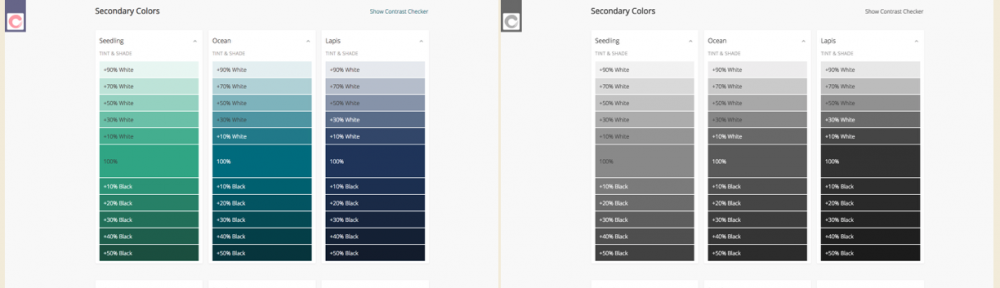
If you want to test how your site would look to a completely color-blind person, you can type this into the browser console:
document.body.style.filter="grayscale(1)";
Try it!

Two screenshots of our colors page, with the left being in full color and the right being displayed monochrome
Adding the `filter: grayscale(1)` CSS rule is an easy way to notice places your design is too dependent on colour